The mail archive allows administrators to find and bulk export copies of archived emails for compliance, auditing, or legal discovery needs. Messages are exported in the standard MBOX format, making them easy to import into most modern email clients and discovery tools.
How to export archived emails
- Log in to your Paubox dashboard.
- Navigate to Paubox Email Suite > Mail Archive.
- Use the Entity, Date, and Terms fields to filter and find the specific messages you want to export, then click Search.
- Select the checkboxes next to the emails you want to export, or select the top checkbox to select all emails in the filtered view.
- Click the Action button and select Export.
- In the pop-up window, enter a name for your export and choose a format (MBOX or PST), then click Export.
Note: Large exports may take some time to process. You do not need to stay on the page while the export runs.
How to download your exported files
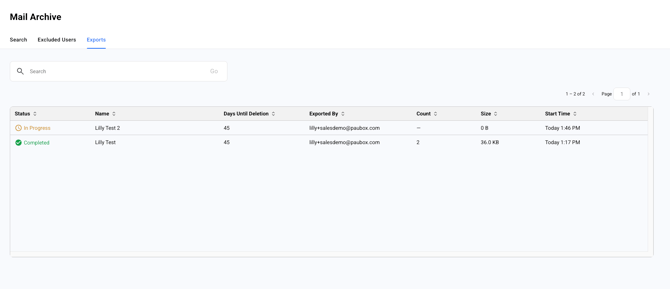
- In the Mail Archive section, click the Exports tab.
- Locate your export in the list to view its status.
- Once the status shows as Completed, click on the export to download the MBOX file to your computer.
Exports are automatically retained and available for download for 45 days after creation, after which they are permanently deleted from the dashboard.
How to restore a mailbox
If you need to recover or restore the contents of a specific mailbox, you can generate a complete export of that user's history.
- On the Mail Archive page, click the Entity dropdown menu and select Specific Mailbox.
- Enter the full email address of the mailbox you need to restore.
- Click the Date dropdown menu and select All.
- Click Search to retrieve all archived messages for that address.
- Click the checkbox at the top left of the table header to select all of the retrieved emails.
- Click the Action button and select Export.
- In the pop-up window, enter a name for your export and choose a format (MBOX or PST), then click Export.