
VIP quarantine reports give admin more control over what they see in quarantine reporting. Instead of receiving domain-wide quarantine activity, admins can now focus reports on specific, high-priority email addresses. This reduces noise, cuts down alert fatigue, and helps security teams pay closer attention to the accounts that matter most.
How VIP quarantine reports work
-
VIP quarantine reports are configured only by customer admin
-
Users cannot see or manage VIP quarantine reports
-
There is one shared VIP quarantine report configuration per customer account
Once enabled, reports are generated automatically based on quarantined activity for the selected email addresses.
What triggers a VIP Quarantine Report
-
The system scans for new quarantined mail for any email addresses included in the VIP list
-
If new mail is found, a report is generated (these are generated and sent every 2 hours, from 6am-6pm)
-
Reports are sent as long as qualifying quarantined mail exists for a listed email address
How to turn on VIP quarantine reports
-
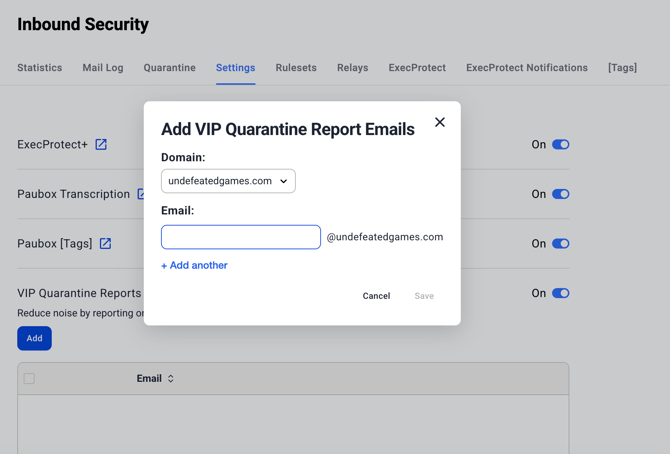
In the Paubox dashboard, navigate to Inbound Security > Settings
- Toggle On the VIP Quarantine Reports setting
- Click Add to add a VIP email address
- Select the domain
- Enter the email address and press Save
FAQs
Q. If an account has multiple admins, does each admin get their own VIP quarantine report?
A. No. There is a single, shared VIP quarantine report configuration per customer account. All admin receive reports based on the same VIP list.
If an admin wants to see their own quarantined emails in VIP quarantine reports, how does that work?
The admin simply adds their own email address to the VIP quarantine report list.
Is there a limit to how many recipients can be included in VIP quarantine reports?
No. There is no limit.
What if an admin enters a misspelled email address that is still on the customer’s domain?
As long as the domain matches the customer’s domain, the address is accepted.